Siemens PLC sourcing desk · Multi-brand automation spares [email protected] +86 18359268345
Siemens In Stock OK

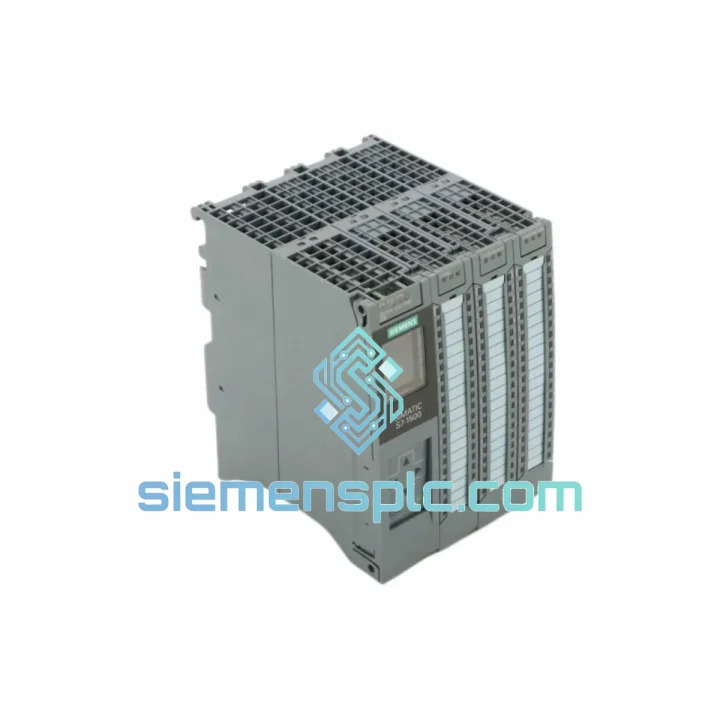
Siemens 6ES7512-1CK01-0AB0 CPU Module

Request verified availability, condition, replacement risk review, packing options and courier lead time for 6ES7512-1CK01-0AB0.

Exact part6ES7512-1CK01-0AB0 RFQ auto-fillPart number attached Export packingDHL / FedEx / UPS Sales replyEmail or WhatsApp
BrandSiemens Part Number6ES7512-1CK01-0AB0 ConditionAvailability Check Lead TimeRFQ Confirmation DocumentsDatasheet / photos by RFQ ShippingExport packing available
Auto-filled RFQ 6ES7512-1CK01-0AB0

Click Request Quote and the part number is inserted into the inquiry form automatically.

Procurement Data

Key Product Information

Core fields for model confirmation and RFQ routing. Detailed product narrative remains below.

Brand
Siemens
Primary Part Number
6ES7512-1CK01-0AB0
Product Type
PLC CPU Module
Series / Family
SIMATIC
Manufacturer
Siemens AG, Germany
Country of Origin
DE
Catalog Category
Communication
Operating Temp.
0 °C to +60 °C
Model confirmed for inquiry 6ES7512-1CK01-0AB0 Send quantity, destination and urgency. The RFQ form keeps this part number attached.
Request Quote
Product Overview

6ES7512-1CK01-0AB0 CPU 1512C-1 PN — Every Hour of Downtime Costs You Money. We Ship Today.

Your S7-1500 rack just went dark. The CPU 1512C-1 PN is dead — no heartbeat on the RUN LED, PROFINET link dropped, line stopped. Your maintenance team has already pulled the module. Now the clock is running: every hour this line sits idle is direct revenue loss, and your OEM lead time is 8–12 weeks. That’s not an option.

We stock the Siemens 6ES7512-1CK01-0AB0 in Xiamen and ship same-day via DHL Express or FedEx International Priority. From our warehouse to your dock — Frankfurt in 2 days, Houston in 3, Singapore overnight. No waiting on Siemens distribution queues. No broker markups. One call, one invoice, one shipment.

This is a 100% original Siemens module, not a clone, not a refurb passed off as new. Every unit ships with its factory seal intact, SIMATIC Memory Card slot verified, and firmware revision confirmed against your TIA Portal project version before dispatch.

URGENT REQUIREMENT? Contact: [email protected] | WhatsApp: +86 18359268345

Quick Technical Datasheet

Parameter Specification
Order Number (MLFB) 6ES7512-1CK01-0AB0
Product Name CPU 1512C-1 PN
Series SIMATIC S7-1500 Compact CPU
Program Memory 250 KB
Data Memory 1 MB
Retentive Memory 10 KB (configurable)
Communication Interface 1× PROFINET IRT (integrated)
Onboard Digital I/O 32 DI / 32 DO (24 V DC)
Onboard Analog I/O 5 AI / 2 AO
High-Speed Counters 6× up to 100 kHz
Pulse Outputs 4× PTO (up to 100 kHz)
Programming Software TIA Portal V13 SP1 and above
Mounting DIN rail (S7-1500 mounting rail)
Supply Voltage 24 V DC (via backplane bus)
Operating Temperature 0 °C to +60 °C
Storage Temperature −40 °C to +70 °C
Degree of Protection IP20
Weight approx. 1,550 g
Manufacturer Siemens AG, Germany
Stock Status ✅ Ready to Ship — Xiamen Warehouse

Troubleshooting & Replacement Tips

Fault Diagnosis Before You Pull the Module

Before condemning the CPU, rule out these common misdiagnoses that waste a replacement cycle:

  • STOP LED solid red, no fault code on display: Check the SIMATIC Memory Card first. A corrupted or missing card will prevent boot. Swap with a known-good card and attempt restart before assuming CPU failure.
  • ERROR LED flashing red: Pull the diagnostic buffer in TIA Portal (Online → Diagnostics → Diagnostic Buffer). Event IDs in the 0x02xx range typically indicate hardware faults internal to the CPU — this is a genuine replacement scenario. IDs in 0x04xx range often point to configuration mismatches that survive a CPU swap.
  • PROFINET link down, CPU otherwise healthy: The integrated PROFINET port on the 1512C-1 PN is on the CPU front face. Check the RJ45 connector for bent pins and verify the switch port is not in error-disabled state before ordering a replacement.
  • CPU powers on but won’t go to RUN: Confirm the project loaded on the Memory Card matches the hardware configuration in TIA Portal. A mismatch between the configured CPU order number and the physical module will lock it in STOP.

Step-by-Step Hot-Swap Replacement Procedure

  1. Document current firmware version — go to Online → Module Information → General in TIA Portal. Note the firmware version (e.g., V2.9.2). Your replacement must match or be updated to match before going live.
  2. Export the project backup — File → Archive in TIA Portal. Store on a local drive, not the Memory Card being transferred.
  3. Power down the rack — de-energize via the PS module. The 1512C-1 PN does not support hot insertion; the entire rack must be powered off.
  4. Remove the Memory Card first — the card sits in the slot on the CPU front face. Extract it before unlatching the module. This card carries your project and firmware — treat it as the most critical component in the swap.
  5. Unlatch and slide out the old CPU — press the orange release lever at the top of the module and slide it forward off the mounting rail. Note the slot position; the CPU must return to slot 0 (leftmost position after the PS module).
  6. Inspect the backplane connector — check for bent pins or contamination on the U-connector before inserting the replacement.
  7. Seat the new CPU — align the guide rails and slide firmly until the latch clicks. Do not force.
  8. Insert the Memory Card — the card is keyed; it only inserts one way. Push until it clicks. The CPU will read the card on first power-up and load the stored project automatically.
  9. Power up and verify — RUN LED should go green within 30–60 seconds. If it stays in STOP, connect TIA Portal online and check the diagnostic buffer immediately.
  10. Firmware update if required — if the replacement unit has a different firmware version, update via TIA Portal Online → Firmware Update before putting the line back into production. A firmware mismatch between CPU and loaded project can cause unpredictable behavior.

Configuration Notes Specific to 6ES7512-1CK01-0AB0

  • No DIP switches: Unlike older S7-300/400 CPUs, the 1512C-1 PN has no physical address switches. PROFINET device name and IP address are assigned via TIA Portal or a PRONETA scan — confirm these are correctly set after replacement, especially if the network uses static IP assignment.
  • Firmware revision -1CK01 vs -1CK00: The -0AB0 suffix denotes hardware revision. The -1CK01 variant introduced improvements to the onboard I/O processing cycle. Projects developed on -1CK00 hardware are generally compatible but should be re-compiled in TIA Portal targeting the -1CK01 hardware before download.
  • Memory Card is not included: The replacement CPU ships without a Memory Card. Transfer your existing card from the failed unit, or order a new SIMATIC Memory Card (6ES7954-8LF03-0AA0 for 4 MB) and reload the project from your TIA Portal archive.
  • Onboard I/O wiring is preserved: The compact I/O terminals are on the CPU front connector, which is a plug-in type. Remove the connector block from the failed CPU and transfer it directly to the replacement — wiring stays intact.

Reliability in Harsh Conditions

The SIMATIC S7-1500 platform was engineered for environments where consumer-grade electronics fail within weeks. The 6ES7512-1CK01-0AB0 is tested and certified to operate continuously under conditions that would destroy lesser hardware.

Vibration & Mechanical Shock: Certified to IEC 61131-2 and EN 60068-2-6 for sinusoidal vibration up to 3.5 mm displacement at 5–8.4 Hz and 1 g acceleration at 8.4–150 Hz. Shock resistance per EN 60068-2-27: 15 g / 11 ms half-sine. This means the module survives the vibration environment of a running press line, a ship engine room, or a mining conveyor drive — not just a clean server room.

Thermal Performance: Rated for continuous operation from 0 °C to +60 °C ambient without derating. The internal thermal management design uses conduction cooling through the backplane, eliminating fan failure as a failure mode. In practice, installations in non-air-conditioned electrical cabinets in Southeast Asian climates — 45 °C ambient, 80% humidity — run without issue when cabinet ventilation is adequate.

Humidity & Condensation: Rated to 95% relative humidity, non-condensing, per IEC 60068-2-78. The conformal coating on the PCB provides additional protection against moisture ingress in environments where temperature cycling causes condensation on cold startup.

EMC Immunity: Compliant with EN 61000-6-2 (industrial immunity) and EN 61000-6-4 (industrial emissions). The integrated PROFINET port includes hardware-level surge protection, reducing vulnerability to ground loop transients common in large industrial facilities with multiple earthing points.

Altitude: Operational up to 2,000 m above sea level without derating. Extended altitude operation up to 4,000 m is possible with derating — contact us for application-specific guidance.

Global Express Logistics

Downtime doesn’t wait for business hours, and neither does our logistics operation. Our Xiamen warehouse is positioned 40 minutes from Xiamen Gaoqi International Airport (XMN), a major DHL and FedEx hub serving direct freighter routes to Europe, North America, and Southeast Asia.

Standard Express Transit Times from Xiamen:

  • Germany / Netherlands / UK: 2–3 business days (DHL Express Worldwide)
  • USA (East Coast): 3–4 business days (FedEx International Priority)
  • USA (West Coast): 2–3 business days (FedEx International Priority)
  • Singapore / Malaysia / Thailand: 1–2 business days (DHL Express)
  • India: 3–4 business days (DHL Express)
  • Australia: 3–4 business days (FedEx International Priority)
  • Middle East (UAE, Saudi Arabia): 2–3 business days (DHL Express)

Our Dispatch Process:

  1. Order confirmed before 14:00 CST → same-day dispatch. Tracking number issued by 18:00 CST.
  2. Export documentation: Commercial invoice, packing list, and certificate of origin prepared in-house. HS Code 8537.10 declared correctly — no customs clearance surprises.
  3. Anti-static packaging: Module sealed in ESD bag, placed in foam-lined carton rated for air freight handling. No bubble wrap shortcuts.
  4. Tracking shared proactively: DHL/FedEx tracking number sent via email and WhatsApp immediately after handover to carrier.
  5. Customs support: We provide all documentation required for import clearance in EU, US, and most Asian markets. For destinations with specific import licensing requirements (e.g., certain dual-use classifications), contact us in advance.

For genuine emergencies — line down, production stopped — call or WhatsApp us directly. We will confirm stock, generate the invoice, and hand the shipment to DHL within 2 hours of payment confirmation during business hours.

Contact Information

Email: [email protected]
WhatsApp: +86 18359268345
Web: siemensplc.com
© 2026 siemensplc.com. All rights reserved.

Ready to quote

Send This Part Number to Sales

[email protected]
RFQ workflow

Confirmation Process

Quality workflow ->
01Model confirmation

We check the full part number, brand, series and visible nameplate information before quotation.

02Availability reply

Sales confirms stock path, condition option, quantity and realistic lead time for export dispatch.

03Packing & courier

DHL, FedEx, UPS or buyer courier arrangements can be reviewed with packing requirements.