

Siemens
RFQ Ready
SIEMENS 6GK5108-0BA00-2AA3 Industrial Ethernet Switch
SIMATIC
Origin DE
Industrial Ethernet Switch
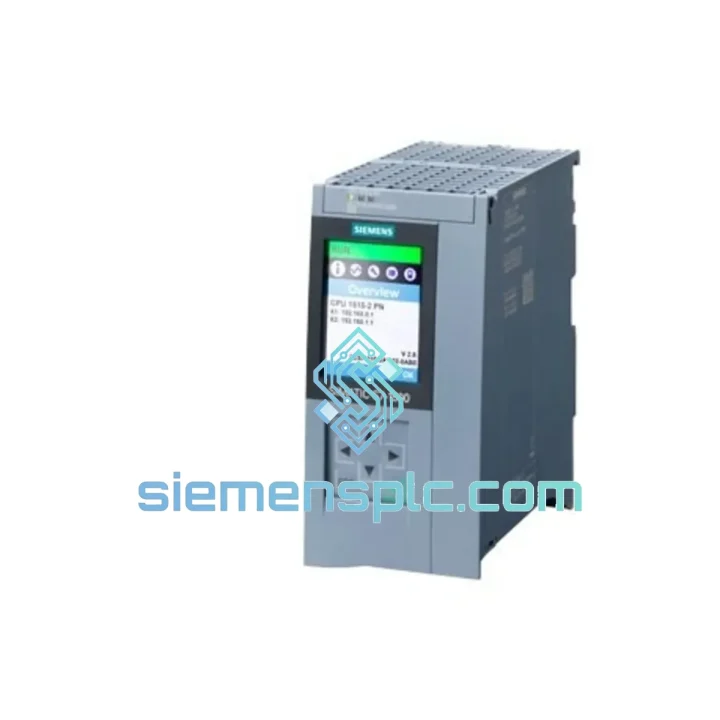
Request verified availability, condition, replacement risk review, packing options and courier lead time for 6ES7515-2AM02-0AB0.
Click Request Quote and the part number is inserted into the inquiry form automatically.
Core fields for model confirmation and RFQ routing. Detailed product narrative remains below.
Your S7-1500 rack is dead. The line is stopped. Maintenance is standing by. You’ve already pulled the CPU and confirmed the fault — now you need a verified replacement in hand, not a lead-time quote that stretches into next week. The Siemens 6ES7515-2AM02-0AB0 is on our shelf in Xiamen right now. We’ve shipped this exact part to plants in Southeast Asia, the Middle East, and Europe on 24-hour turnaround. One call, one unit, line back up.
This is not a refurbished pull. Not a grey-market unit with a sanded label. Every 6ES7515-2AM02-0AB0 we dispatch is inspected against Siemens holographic authentication markers, firmware version, and serial number traceability before it leaves our warehouse. We know what’s at stake when a CPU goes down mid-shift.
URGENT REQUIREMENT? Contact: [email protected] | WhatsApp: +86 18359268345
| Order Number | 6ES7515-2AM02-0AB0 ✔ Ready to Ship |
| Series | SIMATIC S7-1500 |
| CPU Designation | CPU 1515-2 PN |
| Work Memory | 500 KB (code) / 3 MB (data) |
| Bit Processing Speed | 30 ns |
| PROFINET Interfaces | 2x PN — X1 (MII) + X2 (IRT-capable) |
| IRT Support | Yes — Isochronous Real-Time |
| OPC UA | Integrated server (TLS from FW V2.5+) |
| Motion Axes | Up to 30 (speed / positioning) |
| Front Display | Yes — on-device diagnostics |
| Memory Card | SIMATIC Memory Card required (not included) |
| Supply Voltage | 24 V DC |
| Power Draw | ~5.5 W |
| Operating Temperature | 0 degC to +60 degC |
| Protection Rating | IP20 |
| Weight | 596 g |
| TIA Portal Compatibility | V15.1 and above |
| Firmware | V2.x — specify your TIA version at order |
| Country of Origin | Germany |
| Stock Status | In Stock — Xiamen Warehouse |
Common failure signatures for the CPU 1515-2 PN:
Step-by-step replacement procedure:
The S7-1500 platform was engineered for continuous 24/7 industrial operation. The 6ES7515-2AM02-0AB0 operates across 0 degC to +60 degC with no derating at the upper limit — suitable for non-air-conditioned control rooms in tropical climates and hot-aisle cabinet installations.
Vibration resistance is tested to IEC 60068-2-6 (sinusoidal, 5–150 Hz, 1g) and IEC 60068-2-27 (shock, 15g / 11 ms), covering the mechanical stress profiles of compressor skids, press lines, and mobile equipment enclosures. The backplane U-connector system provides a mechanically positive engagement that resists vibration-induced intermittent contact — a known failure mode on older DIN-rail CPUs with screw-terminal backplanes.
EMC immunity is certified to IEC 61000-4 series, including 4 kV contact discharge (ESD), 2 kV fast transient burst (EFT), and 2 kV surge immunity — relevant for installations near large VFD banks, welding equipment, or MV switchgear. The integrated 24 V DC input filtering handles the ripple and transient environment typical of industrial DC bus systems without requiring external line conditioning.
Humidity tolerance extends to 95% RH non-condensing. The conformal coating on the PCB provides additional protection against condensation events during seasonal temperature swings in coastal or riverside plant locations. Units stored in our Xiamen warehouse are maintained in climate-controlled conditions with ESD-safe packaging intact until dispatch.
Our fulfillment operation runs out of Xiamen — one of China’s primary export hubs with direct access to Xiamen Gaoqi International Airport and Xiamen Port. This puts us within one DHL flight of Singapore, Kuala Lumpur, Bangkok, Jakarta, Dubai, and Frankfurt.
Standard express timeline (DHL / FedEx IP):
Orders confirmed before 14:00 CST are processed same day. We prepare the commercial invoice, packing list, and HS Code 8537.10 export documentation in-house — no delays waiting on a freight forwarder. For plant shutdown emergencies, Saturday dispatch and next-flight-out booking are available on request. Each shipment includes full tracking from pickup to delivery. We handle all export compliance for CN-origin industrial electronics, including dual-use screening and destination country import requirements for EU, GCC, and ASEAN markets.
Email: [email protected]
WhatsApp: +86 18359268345
Web: siemensplc.com
© 2026 siemensplc.com. All rights reserved.
We check the full part number, brand, series and visible nameplate information before quotation.
Sales confirms stock path, condition option, quantity and realistic lead time for export dispatch.
DHL, FedEx, UPS or buyer courier arrangements can be reviewed with packing requirements.
Similar brand or category products for fast comparison and multi-item RFQ lists.


