

Siemens
RFQ Ready
SIEMENS 6GK5108-0BA00-2AA3 Industrial Ethernet Switch
SIMATIC
Origin DE
Industrial Ethernet Switch
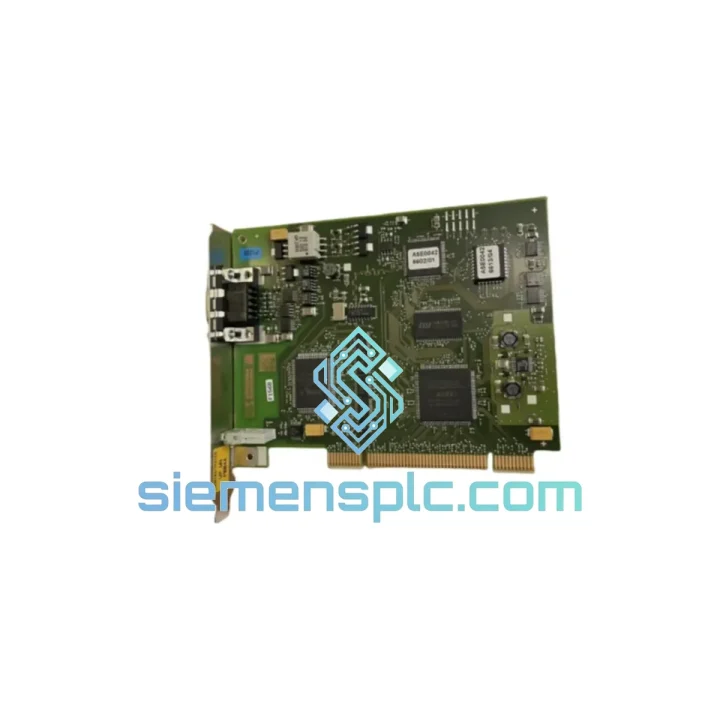
Request verified availability, condition, replacement risk review, packing options and courier lead time for 6GK1561-1AA01.
Click Request Quote and the part number is inserted into the inquiry form automatically.
Core fields for model confirmation and RFQ routing. Detailed product narrative remains below.
Your PROFIBUS network just went silent. The HMI is frozen. The S7-400 rack is throwing BF and SF LEDs. Your shift supervisor is already on the phone. You know the fault: the CP 5611 A2 in the engineering PC has failed — and without it, your entire STEP 7 / WinCC diagnostic chain is blind. The 6GK1561-1AA01 is not a commodity card you can substitute. It is the only PCI-slot PROFIBUS/MPI interface that runs the full SIMATIC NET PC Software stack without driver workarounds. We stock it in Xiamen. We ship it today.
URGENT REQUIREMENT? Contact: [email protected] | WhatsApp: +86 18359268345
| Parameter | Value |
|---|---|
| Part Number | 6GK1561-1AA01 |
| Product Name | CP 5611 A2 |
| Series | SIMATIC NET |
| Bus Interface | PCI (32-bit, 3.3 V / 5 V universal) |
| Field Bus Protocol | PROFIBUS DP / FMS / MPI |
| Max. Baud Rate | 12 Mbit/s |
| Connector | 9-pin Sub-D female (RS-485) |
| Supply Voltage | 3.3 V / 5 V via PCI slot |
| Operating Temperature | 0 °C to +60 °C |
| Storage Temperature | -40 °C to +70 °C |
| Relative Humidity | 5 % to 95 % (non-condensing) |
| Compatible Software | SIMATIC NET PC Software V8.x, STEP 7 V5.x, TIA Portal V15-V19, WinCC V7/V8 |
| Compatible PLCs | S7-300, S7-400, S7-1500 (MPI), S5 via PROFIBUS |
| Certifications | CE, UL, cULus |
| Country of Origin | Germany |
| Stock Status | Ready to Ship — Xiamen Warehouse |
After ten years of pulling failed CP 5611 A2 cards out of engineering stations across petrochemical, automotive, and water-treatment plants, these are the failure patterns and swap pitfalls that will burn you if you skip them.
Common Failure Signatures
Replacement Procedure — Step by Step
Firmware Note: The 6GK1561-1AA01 does not carry user-flashable firmware. The PROFIBUS ASIC firmware is factory-locked. Ensure your SIMATIC NET PC Software version is compatible — V8.1 and above is recommended for Windows 10 / Server 2016 hosts.
The CP 5611 A2 was not designed for an office workstation. It was built to live inside an industrial PC mounted in a control cabinet next to variable-frequency drives, high-current contactors, and pneumatic actuators — all of which generate conducted and radiated interference that would destroy a consumer-grade card within weeks.
The 6GK1561-1AA01 carries a conformal coating on the PCB that resists condensation ingress during temperature cycling — critical in plants where the cabinet door is opened during cold morning startups and the card is exposed to warm humid air. The RS-485 transceiver on the Sub-D port includes surge protection rated to IEC 61000-4-5, absorbing the voltage spikes that propagate down long PROFIBUS cable runs when a motor starter fires nearby.
Vibration tolerance meets IEC 60068-2-6 (sinusoidal, 10–58 Hz, 0.075 mm amplitude; 58–500 Hz, 1 g). In practice this means the card survives being mounted in a panel adjacent to a 75 kW pump motor running 24/7. The PCI edge connector uses gold-plated contacts to prevent the oxidation-driven resistance creep that causes intermittent faults in high-humidity coastal or chemical plant environments.
Operating temperature range of 0 °C to +60 °C covers the vast majority of industrial PC enclosure internal temperatures even in summer. Units stored in our Xiamen warehouse are kept in climate-controlled conditions with humidity monitoring to preserve connector integrity before shipment.
When your line is down, air freight is not a luxury — it is the cheapest option on the table once you factor in lost production. Our Xiamen warehouse is located 12 km from Xiamen Gaoqi International Airport (XMN), one of the highest-throughput cargo hubs in Southeast China, with daily direct freighter connections to Frankfurt, Amsterdam, Dubai, Chicago O’Hare, and Singapore Changi.
Standard Express Flow:
For orders requiring same-day delivery to a local freight forwarder or bonded warehouse in China, contact us directly. We support FCA Xiamen Warehouse terms for customers managing their own international logistics.
Email: [email protected]
WhatsApp: +86 18359268345
Web: siemensplc.com
© 2026 siemensplc.com. All rights reserved.
We check the full part number, brand, series and visible nameplate information before quotation.
Sales confirms stock path, condition option, quantity and realistic lead time for export dispatch.
DHL, FedEx, UPS or buyer courier arrangements can be reviewed with packing requirements.
Similar brand or category products for fast comparison and multi-item RFQ lists.


