
Uniview
In Stock OK
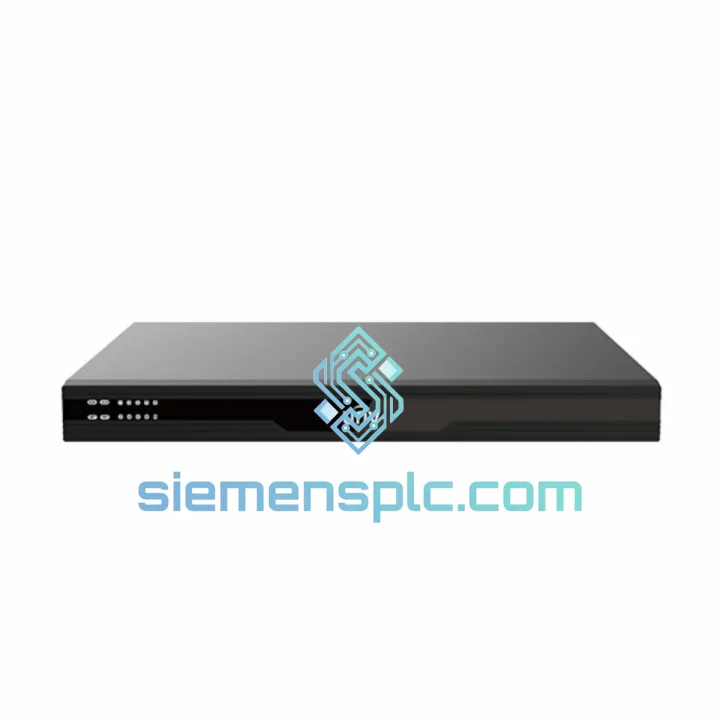
Uniview DC5506 6-Channel HD Video Decoder
Request verified availability, condition, replacement risk review, packing options and courier lead time for DC5506.
BrandUniview
Part NumberDC5506
ConditionAvailability Check
Lead TimeRFQ Confirmation
DocumentsDatasheet / photos by RFQ
ShippingExport packing available
Auto-filled RFQ
DC5506
Click Request Quote and the part number is inserted into the inquiry form automatically.
- Reply by email: [email protected]
- WhatsApp / Tel: +86 18359268345
- Mon-Sat 9:00-18:00 GMT+8
Procurement Data
Key Product Information
Core fields for model confirmation and RFQ routing. Detailed product narrative remains below.
- Brand
- Uniview
- Primary Part Number
- DC5506
- Product Type
- Video Decoder
- Series / Family
- EZ Series
- Country of Origin
- China (Xiamen stock)
- Catalog Category
- Industrial Automation Spares
- Operating Temp.
- −10 °C to +55 °C
- Warranty
- 12 months hardware / 7-day DOA swap
Model confirmed for inquiry
DC5506
Send quantity, destination and urgency. The RFQ form keeps this part number attached.
Request Quote
Product Overview
Uniview DC5506 — Stop the Clock on Your Downtime. Ship Today.
Your video wall just went dark. Six channels offline. The control room is blind. Every minute without the DC5506 in the rack is a minute your operators are flying without instruments — and in a transit hub, a petrochemical plant, or a smart-city command center, that is not a theoretical risk. It is a liability. We stock the Uniview DC5506 in Xiamen, pre-verified, boxed, and ready to hand to DHL before your shift ends. No lead time negotiation. No factory MOQ. One unit, out the door, tracking number in your inbox.
URGENT REQUIREMENT? Contact: [email protected] | WhatsApp: +86 18359268345
Quick Technical Datasheet
| Parameter | Specification | Status |
|---|---|---|
| Model | DC5506 | ✅ Ready to Ship |
| Brand / Series | Uniview (UNV) / EZ Series | OEM Original |
| Decoding Channels | 6 simultaneous independent channels | — |
| Max Output Resolution | 4K (3840 × 2160) per channel | — |
| Video Compression | H.265 / H.264 / MJPEG | — |
| Network Interface | 1 × RJ45 10/100/1000 Mbps | — |
| Video Output | HDMI + VGA (simultaneous) | — |
| Supported Protocols | RTSP, ONVIF Profile S/G, Uniview Private | — |
| Audio I/O | 1 × Line-in / 1 × Line-out | — |
| Operating Temperature | −10 °C to +55 °C | — |
| Power Supply | DC 12 V (external adapter included) | — |
| Certifications | CE / FCC / RoHS | — |
| Country of Origin | China (Xiamen stock) | — |
| Warranty | 12 months hardware / 7-day DOA swap | — |
Troubleshooting & Replacement Tips
Ten years of field calls on Uniview decoders distill down to the same short list of failure modes. Before you condemn the DC5506 board, run through this checklist — and if you have already confirmed hardware failure, use it as your commissioning guide for the replacement unit.
Fault 1 — No video output, power LED solid green. Nine times out of ten this is a stream URL mismatch after a camera firmware update changed the RTSP path. Pull the decoder’s web UI (default 192.168.1.13), navigate to Decode → Channel Config, and re-enter the RTSP string manually. Confirm the camera’s sub-stream resolution does not exceed the channel’s configured decode ceiling.
Fault 2 — Intermittent freeze or mosaic artifacts on one channel only. Isolate the channel. Swap the stream to a known-good camera. If the artifact follows the channel slot, the decode ASIC for that channel has degraded — board replacement is the only fix. If the artifact follows the stream source, the issue is upstream packet loss; check switch port error counters and cable integrity on the camera side.
Fault 3 — Unit reboots under load (all 6 channels active at 4K). Measure the 12 V rail under load. Adapter-supplied units are sensitive to voltage sag; anything below 11.4 V under full decode load will trigger the protection circuit. Replace the power adapter first before condemning the decoder board.
Fault 4 — Web UI unreachable after IP change. The DC5506 does not have a hardware reset button on all revisions. Hold the reset pinhole (rear panel, 3 mm recessed) for 10 seconds with power applied. Factory default: IP 192.168.1.13, mask 255.255.255.0, admin/admin. If the pinhole reset fails on older firmware, a UART console recovery is required — contact us for the recovery image.
Replacement commissioning sequence:
- Power off the failed unit. Label all network and display cables before disconnecting.
- Note the firmware version from the old unit’s system info page if still accessible — match it on the replacement before going live.
- Export the channel configuration XML from the old unit (System → Config Backup). Import directly to the replacement unit to avoid manual re-entry of 6 RTSP streams.
- Verify ONVIF device discovery is enabled on the replacement if your VMS uses auto-discovery — it defaults to OFF on factory firmware.
- Confirm output resolution matches your display’s native panel spec. Mismatched EDID handshake is the most common cause of a blank screen on first boot after swap.
- Run all 6 channels at full load for 30 minutes before signing off. Thermal stress during burn-in catches infant mortality failures before the site engineer leaves.
Reliability in Harsh Conditions
The DC5506 is not a consumer-grade box. It is built to sit in a 24/7 rack in environments that would kill a desktop PC inside a week. The fanless thermal design dissipates heat through the aluminum chassis — no moving parts, no filter to clog, no bearing to seize at 3 AM on a holiday weekend. The operating range of −10 °C to +55 °C covers unheated equipment rooms in northern climates and non-air-conditioned enclosures in Southeast Asian summers without derating.
Vibration tolerance matters in transportation deployments. The DC5506’s solid-state storage and conformal-coated PCB handle the continuous low-frequency vibration of metro station equipment rooms and roadside cabinets without the solder joint fatigue that kills spinning-disk NVRs in the same environment. Humidity resistance — the unit is rated for up to 90% RH non-condensing — means it survives the condensation cycles that occur when a cabinet door is opened in a humid climate and cold air meets warm electronics.
Every unit we ship has been powered on, stream-tested across all 6 channels, and inspected for physical damage before boxing. We do not forward-ship factory-sealed units without verification. If a unit fails within 7 days of receipt, we ship the replacement before we receive the defective unit back — because your site cannot wait for a round-trip RMA cycle.
Global Express Logistics
Stock location: Xiamen, Fujian, China. Xiamen is a designated free-trade port with direct DHL, FedEx, and UPS gateway access — no inland transit delay to a coastal hub. Orders confirmed before 15:00 CST ship same business day. Orders confirmed after 15:00 ship the following morning.
Typical transit times from Xiamen:
- Southeast Asia (SG, MY, TH, VN): DHL Express 2–3 business days
- Middle East (AE, SA, QA): FedEx International Priority 3–4 business days
- Europe (DE, NL, PL, UK): DHL Express 3–5 business days
- North America (US, CA, MX): FedEx IP or DHL Express 4–6 business days
- Australia / New Zealand: DHL Express 3–5 business days
Every shipment includes: commercial invoice, packing list, and certificate of origin for customs clearance. HS Code 8525.89 applies to video decoders in most jurisdictions — we pre-fill all export documentation to eliminate customs hold risk. For orders requiring formal import permits or end-user certificates, contact us 48 hours in advance and we will coordinate the paperwork.
Real-time tracking is provided via DHL/FedEx waybill number sent by email within 2 hours of dispatch. WhatsApp updates are available on request for time-critical shipments.
Contact Information
📧 Email: [email protected]
💬 WhatsApp: +86 18359268345
🌐 Web: siemensplc.com
© 2026 siemensplc.com. All rights reserved.
Ready to quote
[email protected]
Send This Part Number to Sales
RFQ workflow
Quality workflow ->
Confirmation Process
01Model confirmation
We check the full part number, brand, series and visible nameplate information before quotation.
02Availability reply
Sales confirms stock path, condition option, quantity and realistic lead time for export dispatch.
03Packing & courier
DHL, FedEx, UPS or buyer courier arrangements can be reviewed with packing requirements.
Continue sourcing
Browse full catalog ->
Related Automation Parts
Similar brand or category products for fast comparison and multi-item RFQ lists.
ABB
RFQ Ready
ABB 3HAC9330-1 Robot Speed Reducer – IRB6640-205/2.7
lRB240046 RB460
Origin SE
Robot Speed Reducer
ABB
RFQ Ready
ABB YPP109A YPN106A EG2401S-AR DCS Power Module
Symphony Plus
Origin SE
DCS Power Module